CRPx0
- 157
- Global rank
- 131
- Month rank
- 103
- Week rank
CRPx0 is a ransomware threat that uses a staged execution chain involving a disguised executable, Python deployment, system reconnaissance, security-tool disruption, recovery inhibition, scheduled-task persistence, and file encryption. Its behavior includes extensive service and process termination attempts and network communication with suspected command-and-control infrastructure.
- Ransomware
- Type
- Unknown
- Origin
- 1 June, 2026
- First seen
- 16 November, 2026
- Last seen
How to analyze CRPx0 with ANY.RUN
IOCs
IP addresses
- 142.250.181.168
- 172.217.116.4
- 34.104.35.123
- 34.54.88.138
- 95.140.132.86
- 142.251.154.119
- 151.101.64.223
- 192.178.194.138
- 192.178.194.101
- 142.251.157.120
- 192.178.194.93
- 142.251.141.234
- 199.232.174.49
- 104.19.229.21
- 104.18.20.226
- 192.178.194.139
- 142.251.27.139
- 192.178.194.113
- 172.217.23.162
- 104.19.230.21
Hashes
- 852597258700e981dc5175ea5370016d8560eb2ab921b041f9fdcdc07332710f
- 99f3754dec345ed71e2bcb337e3cdc58b1a4c02d290d870dc20ccdd1ff543ae1
- 7497fbdbb98afca4ac455e3a057c59bcdebaf1280e25c94741dc301f05cb53e5
- 668c99e076dfb95e014829c4028460dee94a32b1fbb1c44116dffbf2dc48bf5b
- 7b9eb3a8af1d12da22604845995982ca99992876a825f3765e053ddb592620ab
- 1c99489111112d2150db0e18bbd474ff45f78fef80fa0e533dfd9ecfc6a3a480
- a4ee2573fa9d94cdc6d508fc3f6782c66f50b76f0d6f58d38f1a8a7ec5f4d58f
- 3c6bf538b5427277525e6ee7761734b7f808e7ad18a8e9807b9e4548468c061d
- 14d8a7a2fe90f7d2103d966e5657c0489be794ca282998fa1bad9866d2a72a36
- df7811b3b90524a24ea6980203a77d22fc655e5c9fee09b575a2209051fe45ad
- 663626e1b1aa735bb5b6aab16090f60120bff4a34d1ad2f84248ffa998fc610f
- fca7da93161d658a847b9d44ed099b21dec639b026057505e043f9abb26e11a4
- 8c1f0561cd34eccb29cbe33ef9b50def2e066e8c7c24da138105ddff056a310b
- f6b92d8b351a8fa2a11ef3779cc9b2de5bff9f195694a3c731ffe624aec4daf9
- 3b7b89124e09f2787efd6c88035bdfeb46273e98fce31f6458c8a8bb273418d5
- ff3939fb201be73180c56f2c151d08d3c74ec3f61847cb80dfa0e4f8fa5adc8c
- 542d4619193d0b3225fc6e30ed292dbe3893a56c3f56ec1c850476ac8abcfd32
- 58922ad2ce45db1810fc43f356ee5691cb712eeabd0877d3b696b7c1485fdf69
- adca4026db08badda677f6c572da9b45b683d3d95c10a650785e84ecd7572f07
- bbb14847be538fe406c3f5f2f040f4f0e69f7536ba610c7c555d31c86c3f788f
Domains
- www.google.com
- www.virustotal.com
- safebrowsing.googleapis.com
- fonts.gstatic.com
- encrypted-tbn0.gstatic.com
- update.googleapis.com
- newassets.hcaptcha.com
- content-autofill.googleapis.com
- ogads-pa.clients6.google.com
- encrypted-tbn3.gstatic.com
- www.googletagmanager.com
- clients1.google.com
- 3f42e800f441.w.hcaptcha.com
- play.google.com
- optimizationguide-pa.googleapis.com
- accounts.google.com
- rr3---sn-gxuo03g-3c2s.gvt1.com
- www.gstatic.com
- imgs3.hcaptcha.com
- redirector.gvt1.com
URLs
- https://accounts.google.com/listaccounts?gpsia=1&source=chromiumbrowser&json=standard
- https://clientservices.googleapis.com/chrome-variations/seed?osname=win&channel=stable&milestone=109
- https://bazaar.abuse.ch/browse/signature/crpx0/
- https://bazaar.abuse.ch/css/bootstrap.min.css
- https://bazaar.abuse.ch/css/all.min.css
- https://bazaar.abuse.ch/css/datatables.min.css
- https://bazaar.abuse.ch/css/jumbotron.css
- https://bazaar.abuse.ch/css/custom.css
- https://bazaar.abuse.ch/js/jquery-3.5.1.min.js
- https://bazaar.abuse.ch/js/popper.min.js
- https://bazaar.abuse.ch/js/bootstrap.min.js
- https://bazaar.abuse.ch/js/clipboard.min.js
- https://bazaar.abuse.ch/js/chart.bundle.min.js
- https://bazaar.abuse.ch/js/bazaar_charts.js
- https://bazaar.abuse.ch/js/datatables.min.js
- https://bazaar.abuse.ch/images/malwarebazaar_logo.svg
- https://bazaar.abuse.ch/webfonts/fa-solid-900.woff2
- https://bazaar.abuse.ch/webfonts/fa-regular-400.woff2
- https://bazaar.abuse.ch/webfonts/fa-brands-400.woff2
- https://bazaar.abuse.ch/ajax/
Last seen at
Key Takeaways
- Python-Based Execution: CRPx0 deploys an embedded Python environment and installs dependencies before launching its main ransomware script.
- System Reconnaissance: The malware collects operating system, hardware, regional, process, and network information while checking for virtualization.
- Security Disruption: CRPx0 generates substantial activity while attempting to stop and remove security services and terminate antivirus processes.
- Recovery Inhibition: The ransomware deletes Volume Shadow Copies and removes backup-related data, complicating file recovery.
- Persistence: A scheduled task named OneDrive Sync Maintenance launches the malware at user logon.
- File Encryption: ANY.RUN detects CRPx0 encryption activity consistent with ransomware targeting user documents.
- Detection: Service-control commands, suspicious Python deployment, recovery deletion, scheduled-task creation, and encryption behavior provide opportunities for detection.
- ANY.RUN’s Interactive Sandbox analysis reveals CRPx0's execution sequence, including its preparation of Python, reconnaissance, defense evasion, persistence, and ransomware activity.
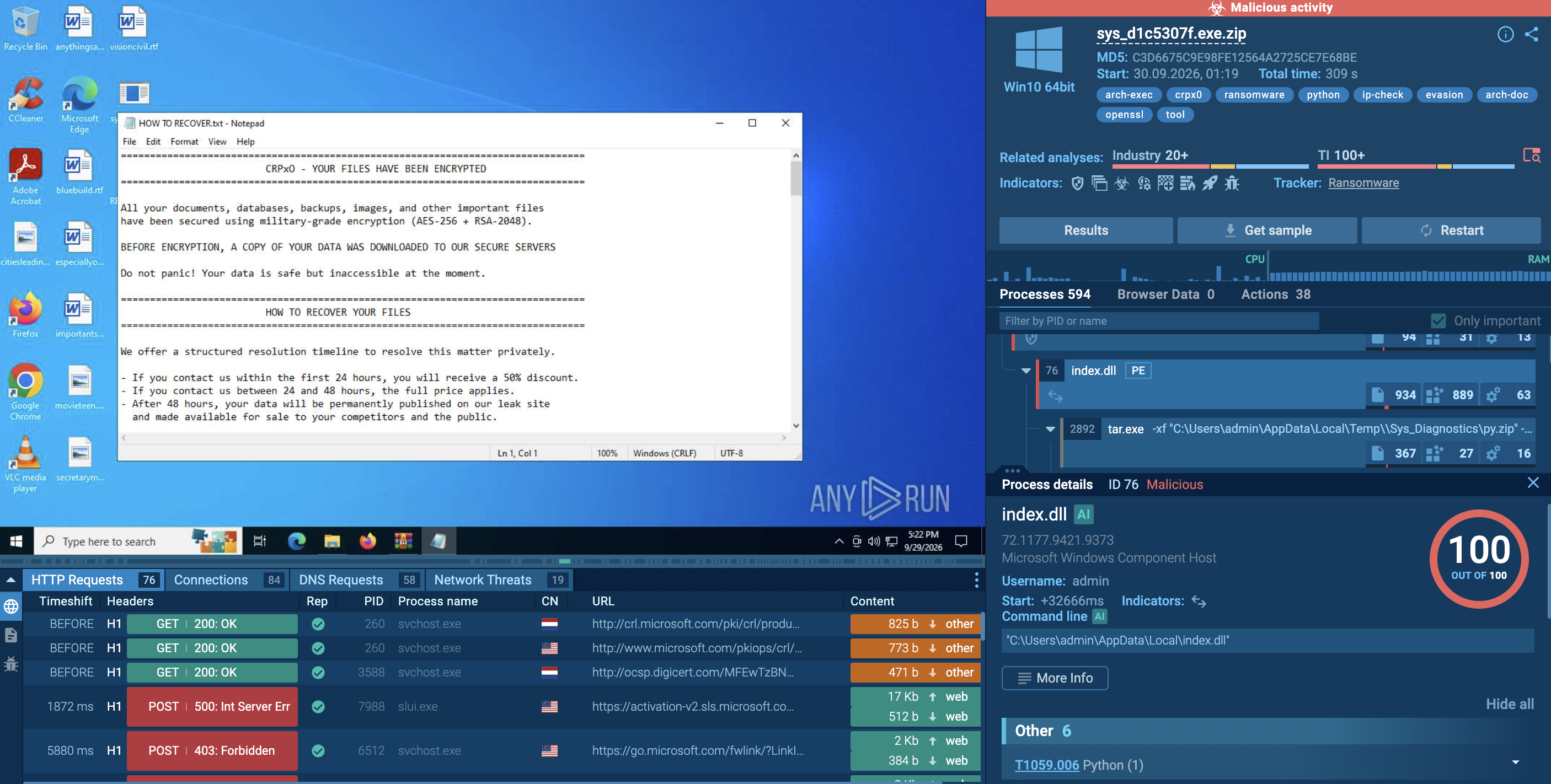
What is CRPx0?
CRPx0 is a ransomware targeting Windows environments. Its observed execution chain combines a manually launched executable, a disguised DLL file, a Python-based payload, and multiple system-level commands intended to prepare the environment for encryption.
Rather than relying on a single executable containing every component, CRPx0 establishes its own Python environment and executes a script called sys_service.py.
The analyzed sample demonstrates several behaviors commonly associated with ransomware operations:
- System and process reconnaissance.
- Virtualization checks.
- Antivirus and endpoint security disruption.
- Backup and shadow-copy deletion.
- Logon-triggered persistence.
- Network communication with suspected attacker infrastructure.
- Encryption of user data.
The analysis also highlights the extensive activity generated during defense evasion. ANY.RUN recorded hundreds of processes and command-shell executions, providing useful behavioral characteristics for security monitoring.
The findings presented here are based on one analyzed sandbox execution. They describe observed behavior rather than proving that every CRPx0 sample or campaign uses an identical implementation.
How CRPx0 Can Affect Businesses and Organizations
CRPx0 can disrupt business operations by encrypting files, interfering with endpoint protection, and removing recovery mechanisms.
Potential consequences include:
- Business Documents: Contracts, invoices, spreadsheets, reports, and other user files may become inaccessible.
- Operational Disruption: Employees may lose access to critical documents and workflows.
- Security Degradation: Attempts to disable endpoint protection can leave affected systems less capable of detecting additional malicious activity.
- Recovery Challenges: Removing shadow copies and backup-related data can eliminate convenient recovery options.
- Infrastructure Exposure: Additional compromised systems may become vulnerable if the malware spreads or related attacker activity continues.
- Incident Response Costs: Investigation, containment, recovery, and restoration can require substantial resources.
The severity of an incident depends on the affected system, the data stored locally, available backup infrastructure, and whether the ransomware reaches additional endpoints.
Victimology: Which Organizations May Be at Risk?
The analyzed CRPx0 sample targets Windows environments and relies on a user executing an executable delivered inside an archive.
Potentially exposed environments include:
- Corporate Windows workstations.
- Employee systems containing business documents.
- Windows endpoints with insufficient application execution restrictions.
- Systems where users can execute files downloaded from external sources.
- Environments with inadequate endpoint monitoring or recovery protections.
Any Windows environment where users can execute untrusted files may face similar ransomware delivery risks.
How Does CRPx0 Function?
Observing a CRPx0 sample inside ANY.RUN’s Interactive Sandbox reveals an execution chain that combines manual execution, Python environment deployment, reconnaissance, defense evasion, recovery inhibition, persistence, network communication, and file encryption.
Stage 1: Archive Execution and Initial Launch
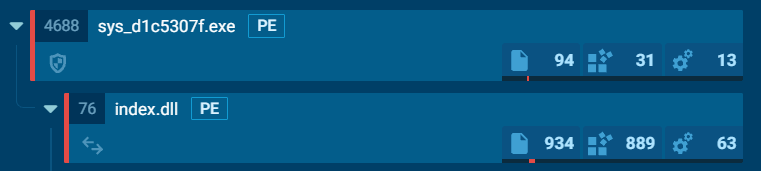
The infection begins when a user opens an archive in WinRAR and manually launches sys_d1c5307f.exe.
This behavior corresponds to MITRE ATT&CK T1204.002 — Malicious File.
The executable subsequently launches C:\Users\admin\AppData\Local\index.dll.
Despite its .dll extension, the file is executable and is assessed as malicious by the sandbox.
The use of a DLL-like filename for an executable may complicate casual inspection and illustrates why file extensions alone should not be trusted.
Stage 2: Python Environment Deployment
CRPx0 prepares a Python environment because Python may not already be installed on the infected machine.
The observed preparation sequence includes:
- Downloading python-3.10.11-embed-amd64.zip from python.org.
- Extracting the archive using tar.exe.
- Creating the directory %TEMP%\Sys_Diagnostics\python.
- Downloading get-pip.py from bootstrap.pypa.io.
- Installing Python packages from pypi.org and files.pythonhosted.org.
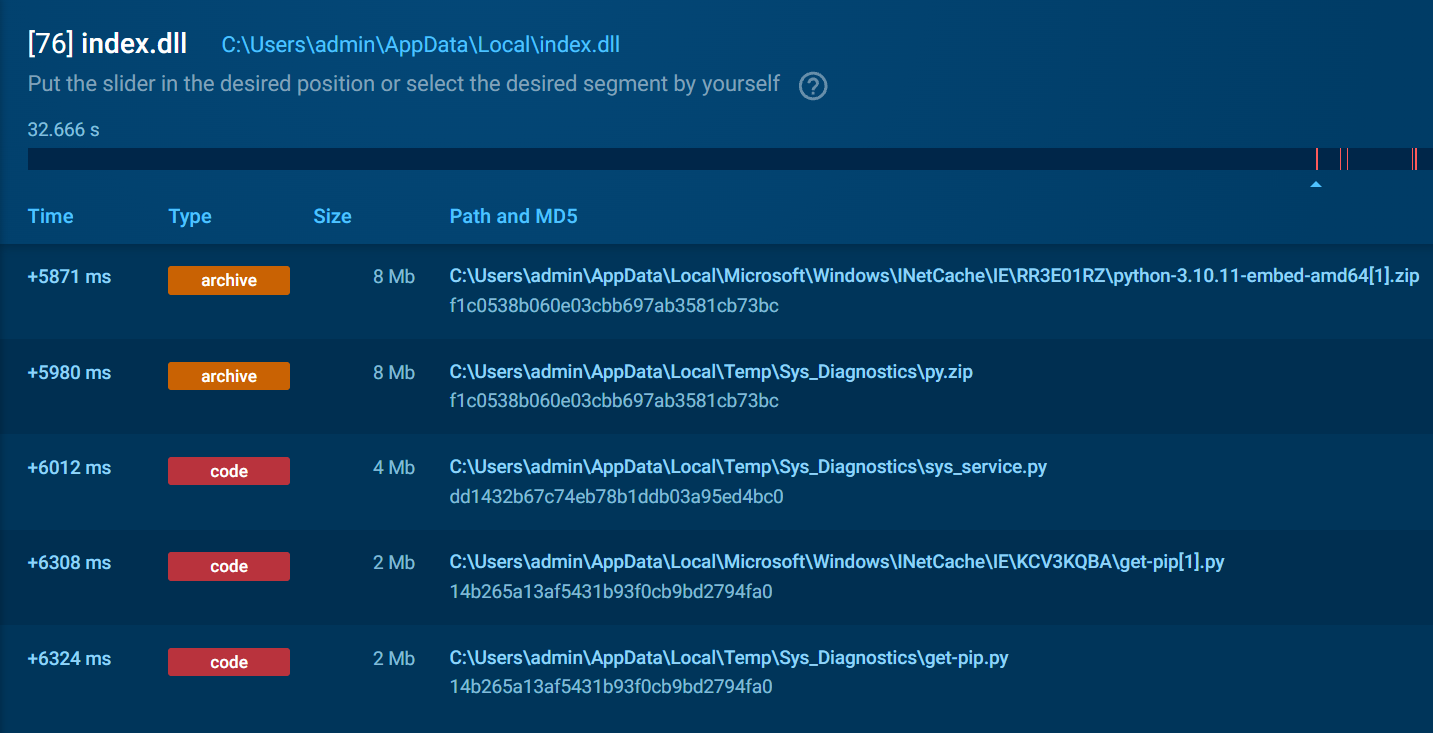
The sandbox also identifies cffi-gen-src.exe among the installed files and detects OpenSSL, indicating the presence of cryptographic-related components.
A Suspicious source code drop detection associated with MITRE ATT&CK T1027.004 — Compile After Delivery highlights source-code material being written to disk.
After preparing the environment, CRPx0 launches its main Python script:
python.exe sys_service.py
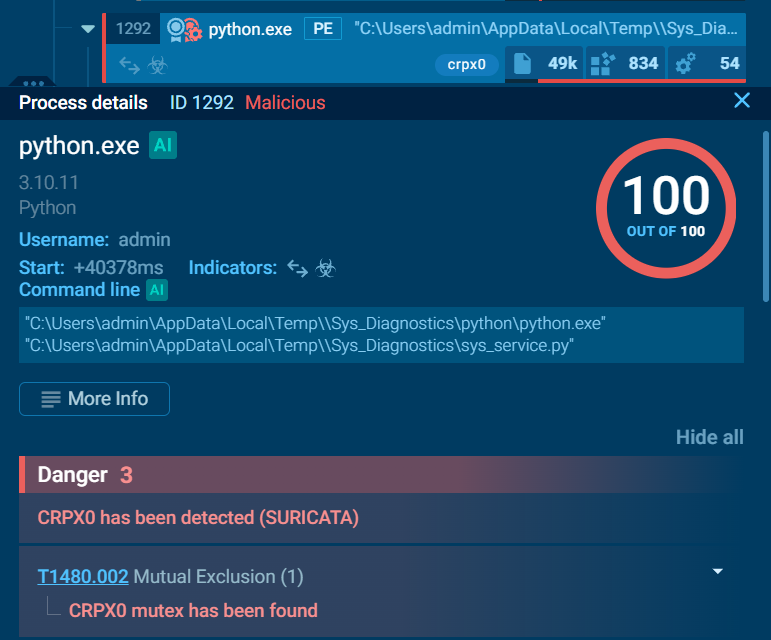
This stage introduces several opportunities for detection, including unexpected Python downloads, package installation activity, and execution from a temporary directory.
Stage 3: System Reconnaissance and Environment Checks
Once the Python script starts, CRPx0 collects information about the compromised environment.
Observed reconnaissance includes:
- Reading the Windows MachineGUID.
- Collecting the computer name and operating system version.
- Retrieving CPU information.
- Reading language and regional settings.
- Enumerating running processes.
- Obtaining the external IP address through ip-api.com/json.
- Checking for VirtualBox using sc query VBoxService.
These activities correspond to several MITRE ATT&CK techniques:
- T1082 — System Information Discovery
- T1614 — System Location Discovery
- T1057 — Process Discovery
- T1016 — System Network Configuration Discovery
The VirtualBox service check is consistent with virtualization and sandbox-awareness behavior.
CRPx0 also creates a mutex named CRPx0.
This mutex prevents multiple instances of the malware from running simultaneously and corresponds to T1480.002 — Mutual Exclusion.
Stage 4: Security Product Disruption
Security-tool disruption is one of the most prominent stages in the analyzed execution.
ANY.RUN recorded 762 processes and 253 executions of cmd.exe.
The malware uses cmd /c to invoke commands that attempt to stop security services, delete service configurations, and terminate processes.
The observed operations include three main groups.
1. Service stopping — 114 operations
CRPx0 attempts to stop services associated with security products, including:
- F-Secure
- Sophos Anti-Virus
- Symantec (ccEvtMgr, ccSetMgr, rtvscan)
- CrowdStrike (CSAgent)
- SentinelOne (S1Management)
- FortiEDR
- Palo Alto Traps
- Webroot (WRSA)
- ESET (eamon)
- Malwarebytes (MBAMAgent)
- swi_service
These commands use net stop ... /y to attempt service termination.
2. Service stopping and deletion — 58 operations
The malware also invokes sc stop and sc delete against security-related services.
Observed targets include:
- SecurityHealthService
- Traps
- SophosClean
The deletion of the SophosClean service is particularly relevant because it represents an attempt to remove a security component rather than simply stop it.
3. Process termination — 68 operations
CRPx0 uses taskkill /f /im to forcibly terminate security-related processes.
Observed examples include:
- MsMpEng.exe — Microsoft Defender Antivirus
- AvastUI.exe
- mbamservice.exe
These behaviors are associated with:
- T1489 — Service Stop
- T1562.001 — Impair Defenses: Disable or Modify Tools
The repeated service-control commands and process termination attempts generate a substantial behavioral footprint.
Stage 5: Recovery Inhibition
Before encrypting files, CRPx0 attempts to remove mechanisms that could support recovery.
The observed commands include:
vssadmin delete shadows /all /quiet
This command deletes Volume Shadow Copies, corresponding to MITRE ATT&CK T1490 — Inhibit System Recovery.
The script also uses wbadmin to remove backup-related data.
These operations can significantly complicate recovery, especially when organizations depend on local shadow copies or accessible backup infrastructure.
Defenders should monitor shadow-copy deletion and backup-management commands when they originate from unexpected processes or occur alongside ransomware-like activity.
Stage 6: Logon Persistence
CRPx0 establishes persistence through Windows Task Scheduler.
The malware creates a scheduled task named OneDrive Sync Maintenance.
The task uses an ONLOGON trigger and launches:
python.exe sys_service.py bootstrap_done
The argument bootstrap_done indicates that the Python environment preparation stage has already completed.
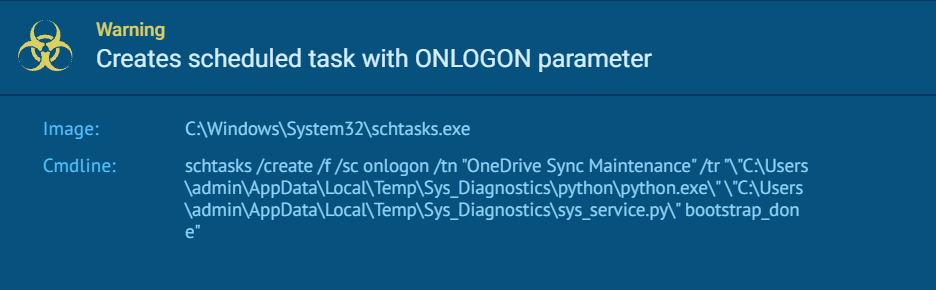
The task's name resembles a legitimate OneDrive maintenance component, potentially making it less conspicuous during casual inspection.
This behavior corresponds to MITRE ATT&CK T1053.005 — Scheduled Task/Job: Scheduled Task.
The combination of a misleading task name, a logon trigger, and Python execution from a temporary or unusual directory provides a useful detection opportunity.
Stage 7: Network Communication
The sandbox records several network-related indicators associated with CRPx0.
Observed activity includes:
- Connections to 207.180.29.236:8080.
- DNS requests involving an onion domain.
- HTTP requests using a fabricated Windows User-Agent.
A detection associated with downloading a ZIP archive containing an executable, consistent with Python environment deployment.
The observed onion domain is xburs4nr6cbuktokhqwefeh5hsjakz6usll5o7z5uhrfcnolakj4ptad.onion.
The connection to the IP address and the onion-domain requests are relevant investigative indicators.
However, the available execution summary does not establish the precise purpose of every network request or confirm that all observed infrastructure is exclusively associated with CRPx0.
Stage 8: File Encryption
The final observed impact includes ransomware encryption activity.
ANY.RUN detects CRPx0 encryption behavior corresponding to MITRE ATT&CK T1486 — Data Encrypted for Impact.
The arch-doc detection and file creation activity within the user directory are consistent with encryption targeting user documents.
The available summary does not specify:
- The final extension applied to encrypted files.
- The complete list of targeted file types.
- Whether a ransom note was created.
- The encryption algorithm.
- The ransom demand or payment instructions.
The presence of encryption activity confirms that the sample behaves as ransomware, while the precise impact on an affected environment requires additional evidence.
CRPx0 Detection Indicators
Effective detection should combine process, file, network, service, scheduled-task, and file-system telemetry.
Individual filenames or IP addresses may change between deployments, so defenders should prioritize behavioral correlations.
File and Process Indicators
Look for:
- sys_d1c5307f.exe executed from an archive or user-controlled location.
- Executable content stored as %LOCALAPPDATA%\index.dll.
- Python deployed under %TEMP%\Sys_Diagnostics\python.
- sys_service.py launched by an unexpected Python interpreter.
- bootstrap_done appearing as a Python script argument.
- Unexpected ((ZIP downloads** followed by Python package installation.
- Suspicious source-code files written to disk.
Service and Process Activity
Potential indicators include:
- Repeated net stop ... /y commands.
- Unexpected sc stop and sc delete operations.
- Attempts to terminate MsMpEng.exe.
- Attempts to terminate antivirus and endpoint protection processes.
- Large bursts of cmd.exe executions.
- Multiple security services being targeted in a short period.
Persistence Indicators
Investigate scheduled tasks named OneDrive Sync Maintenance.
The task is particularly suspicious when it:
- Uses an ONLOGON trigger.
- Executes Python from %TEMP% or another unusual location.
- Launches sys_service.py.
- Includes the bootstrap_done argument.
- Appears shortly after suspicious archive execution.
Recovery-Inhibition Indicators
Monitor:
- vssadmin delete shadows /all /quiet
- Unexpected wbadmin activity.
- Attempts to remove backup-related data.
- Shadow-copy deletion followed by suspicious file modifications or encryption.
These commands can have legitimate administrative uses, so detection should incorporate process ancestry, user context, and surrounding activity.
Network Indicators
The following artifacts were observed in the analyzed sample:
- 207.180.29.236:8080
- xburs4nr6cbuktokhqwefeh5hsjakz6usll5o7z5uhrfcnolakj4ptad.onion
- ip-api.com/json
- python.org
- bootstrap.pypa.io
- pypi.org
- files.pythonhosted.org
Legitimate Python distribution services may also appear in normal enterprise activity. Their presence alone is not malicious; the important signal is their association with suspicious execution and ransomware behavior.
Encryption Indicators
Monitor:
- Rapid creation or modification of files in user directories.
- Unusual access to large numbers of documents.
- Unexpected changes in file extensions.
- Increased file-write activity from Python processes.
- File modifications accompanied by shadow-copy deletion and security-service termination.
Correlating these behaviors can provide earlier and more reliable detection than isolated IOC matching.
Threat Intelligence and Investigation
CRPx0's staged execution and network activity make it important to correlate multiple artifacts rather than investigate individual indicators in isolation.
Investigators should examine:
- Initial archive delivery and executable contents.
- File hashes and extracted components.
- Python environment downloads.
- Process ancestry and command-line arguments.
- Scheduled-task creation.
- Security-service stop and deletion operations.
- Shadow-copy and backup deletion.
- Network destinations and DNS requests.
- Files created or modified during encryption.
ANY.RUN’s Interactive Sandbox can help reconstruct the execution chain, inspect process relationships, review HTTP requests, and identify files created by the ransomware.
ANY.RUN’s Threat Intelligence Lookup then helps correlate suspicious hashes, IP addresses, domains, and other artifacts with previous analyses.
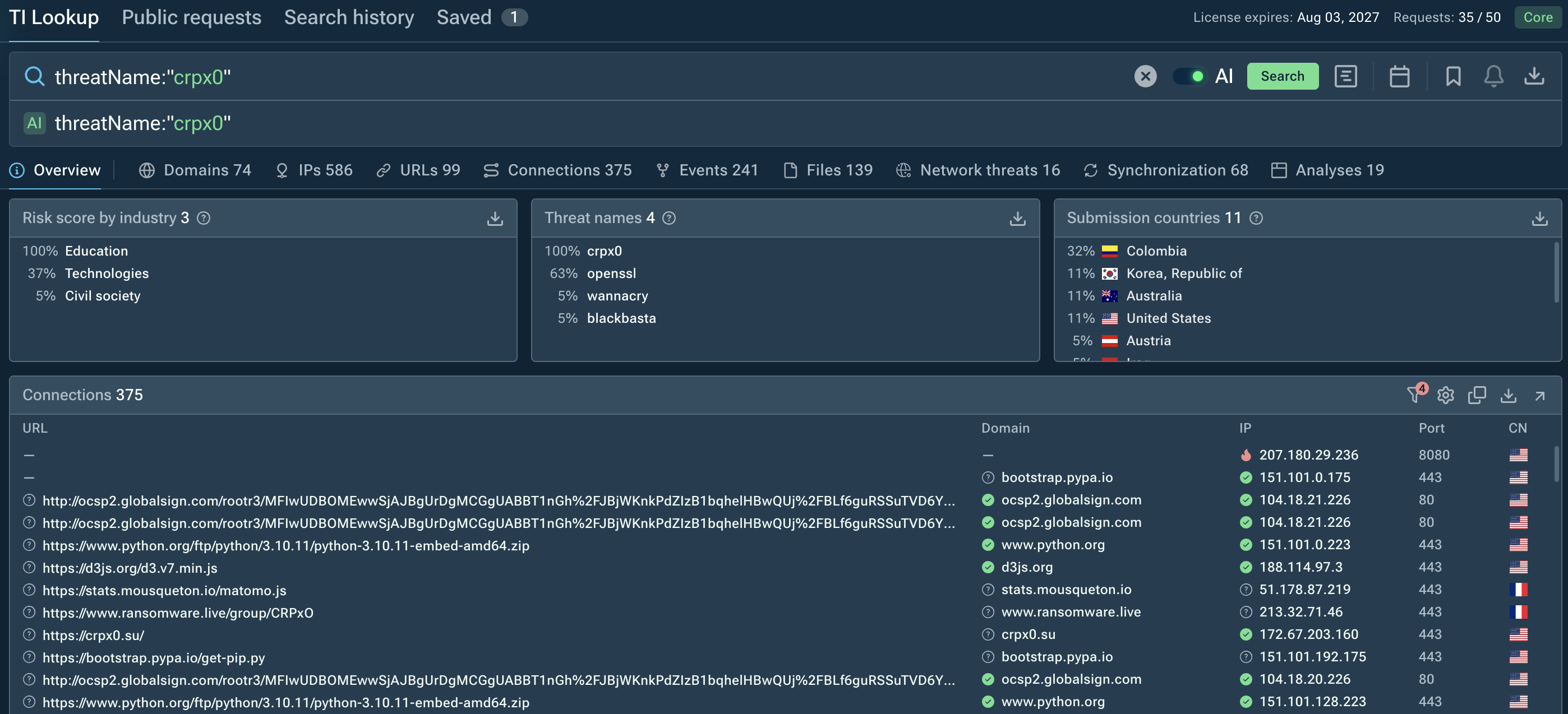
To strengthen defenses against CRPx0, security teams can integrate Threat Intelligence Feeds into their existing security stack. TI Feeds continuously deliver fresh malicious indicators from real-world threat analyses, helping SOC and MSSP teams detect ransomware activity, identify suspicious infrastructure, and keep detection rules and monitoring workflows aligned with emerging CRPx0 threats.
Together, sandbox investigation and threat intelligence can help analysts distinguish the initial loader from subsequent ransomware behavior and identify related activity.
CRPx0 Incident Response
When CRPx0 activity is suspected, responders should treat the affected system as potentially compromised and prioritize containment before attempting recovery.
Recommended actions include:
- Isolate affected endpoints: Disconnect compromised systems from the network while preserving evidence and following incident-response procedures.
- Protect backup infrastructure: Restrict access to backup systems and verify that unaffected recovery copies remain available.
- Investigate security disruption: Determine whether endpoint protection services were stopped, deleted, or otherwise impaired.
- Review persistence: Inspect scheduled tasks, particularly OneDrive Sync Maintenance, and identify suspicious Python execution.
- Assess encryption impact: Determine which files were modified or encrypted and whether additional systems are affected.
- Investigate network activity: Review connections to identified infrastructure and search for related communications.
- Preserve forensic evidence: Retain archives, executable files, Python components, process logs, network records, scheduled-task definitions, and relevant file artifacts.
- Secure compromised systems: Rebuild affected endpoints when appropriate, restore from verified clean backups, and validate that security controls are functioning before returning systems to production.
- Hunt for related activity: Search the environment for matching hashes, paths, task names, service-control patterns, and encryption behavior.
Organizations should not assume that stopping the encryption process alone resolves an incident. Persistence, compromised access, and additional attacker activity must also be investigated.
How Organizations Can Prevent CRPx0
Several defensive measures can reduce the likelihood of CRPx0 execution and limit its impact.
Endpoint Protection
- Deploy and maintain modern endpoint detection and response solutions.
- Protect security services against unauthorized termination.
- Monitor service deletion and suspicious process-kill commands.
- Enable tamper protection where supported.
- Investigate unexpected Python execution from temporary directories.
Application Execution Controls
- Restrict execution of untrusted files downloaded from external sources.
- Apply application control policies such as Windows Defender Application Control or AppLocker where appropriate.
- Limit executable content in user-writable directories.
- Prevent unnecessary execution of scripts and interpreters.
- Inspect archive contents before allowing execution.
Backup and Recovery Protection
- Maintain offline or immutable backups.
- Separate backup infrastructure from ordinary workstation credentials.
- Monitor shadow-copy deletion and backup modification.
- Test recovery procedures regularly.
- Ensure backup copies remain accessible when production systems are compromised.
Monitoring and Detection
- Alert on suspicious combinations of service stopping, process termination, and file encryption.
- Monitor scheduled-task creation and unusual logon triggers.
- Track Python deployment and package installation activity.
- Correlate suspicious network requests with endpoint execution.
- Detect rapid file modifications across user directories.
User Awareness
- Train employees to recognize suspicious password-protected documents.
- Discourage execution of unknown files extracted from archives.
- Encourage reporting of unexpected invoices, contracts, and business attachments.
- Reinforce that file extensions do not establish whether a file is safe.
Conclusion
CRPx0 demonstrates how ransomware combines Python deployment, security-tool disruption, recovery inhibition, persistence, and file encryption to compromise Windows systems.
Its attempts to disable antivirus products, delete backups, and establish persistence provide defenders with multiple detection opportunities.
Correlating suspicious execution, defense evasion, recovery deletion, and encryption activity is essential to detecting CRPx0 and limiting ransomware impact.
Frequently Asked Questions: CRPx0
1. What is CRPx0?
CRPx0 is a ransomware threat that targets Windows systems, prepares a Python environment, attempts to disable security tools, removes recovery mechanisms, establishes persistence, and encrypts user files.
2. How does CRPx0 infect a system?
In the analyzed execution, a user opens an archive in WinRAR and manually launches sys_d1c5307f.exe. The executable starts a disguised DLL-like file, which prepares Python and launches the main ransomware script.
3. Why does CRPx0 install Python?
The malware deploys Python because a suitable interpreter may not already exist on the compromised machine. It downloads an embedded Python distribution, installs dependencies, and uses Python to execute its main script.
4. Does CRPx0 disable antivirus software?
The analyzed sample attempts to stop and delete multiple security services and forcibly terminate antivirus and endpoint protection processes. These behaviors are consistent with defense evasion.
5. How does CRPx0 prevent file recovery?
CRPx0 executes vssadmin delete shadows /all /quiet and uses wbadmin to remove backup-related data. These actions can eliminate recovery options available on the affected system.
6. How does CRPx0 maintain persistence?
The malware creates a scheduled task named OneDrive Sync Maintenance, triggered at user logon. The task launches Python and sys_service.py with the bootstrap_done argument.
7. Does CRPx0 communicated with attacker infrastructure?
The sandbox observed connections to 207.180.29.236:8080 and DNS requests involving an onion domain. These are useful investigation indicators, although the precise purpose of every request requires additional analysis.
8. What files does CRPx0 encrypt?
The sandbox detects encryption activity consistent with ransomware targeting user documents. The available summary does not establish the complete file-extension list or the final encrypted-file naming scheme.
9. How can organizations detect CRPx0?
Monitor suspicious archive execution, Python deployment in temporary directories, repeated security-service termination, shadow-copy deletion, scheduled-task creation, suspicious network activity, and rapid document modification.
10. How can sandboxing and threat intelligence help investigate CRPx0?
Interactive sandboxing reveals CRPx0's execution behavior, including antivirus disabling, shadow copy deletion, persistence mechanisms, and file encryption. Meawhile, threat intelligence correlate CRPx0 samples, indicators, and infrastructure with previous analyses.
Other malware & phishing threats
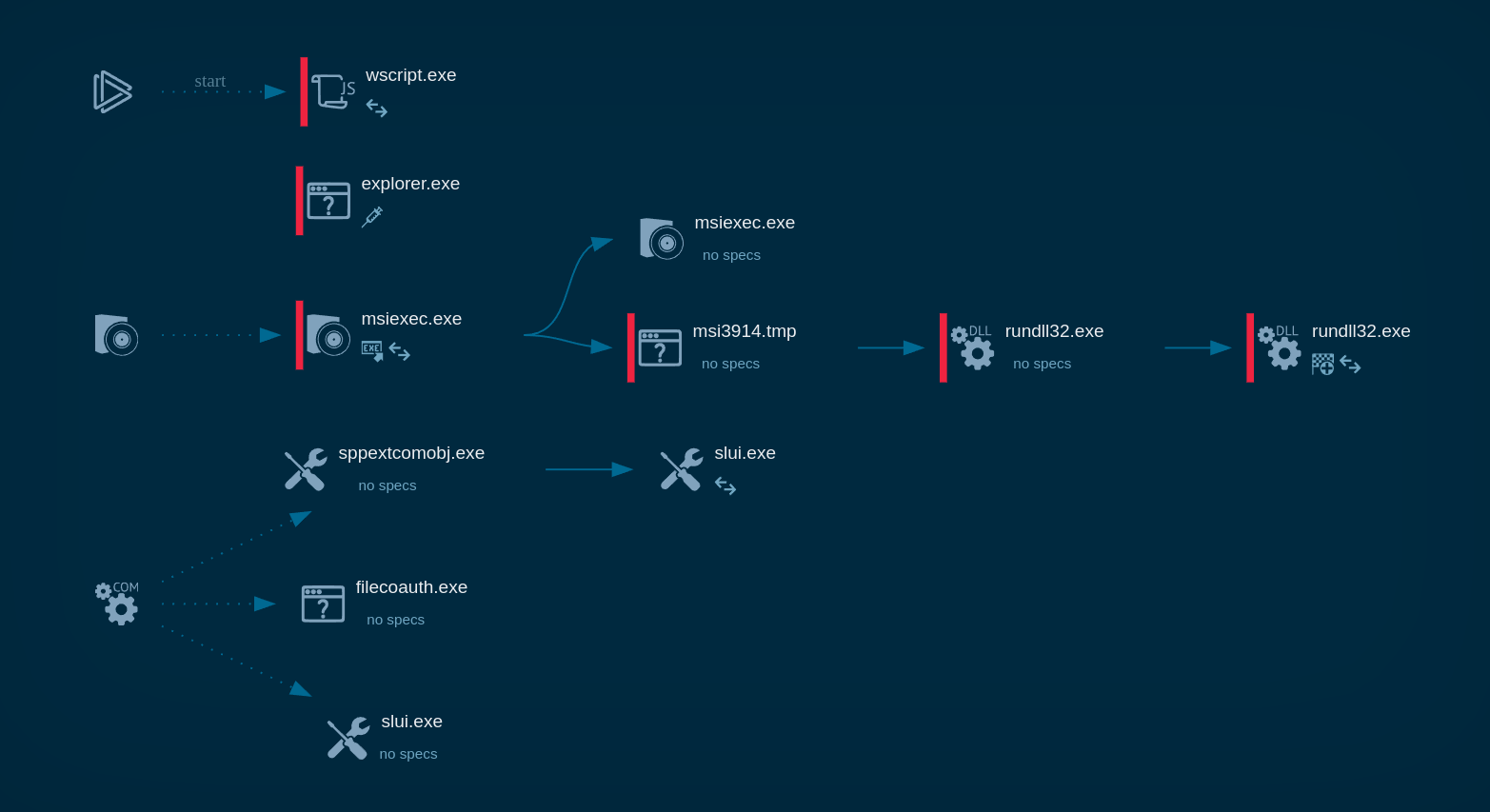 LatrodectusLatrodectus is a malicious loader that is used by threat actors to gain a foothold on compromised devices and deploy additional malware. It has been associated with the IcedID trojan and has been used by APT groups in targeted attacks. The malware can gather system information, launch executables, and detect sandbox environments. It uses encryption and obfuscation to evade detection and can establish persistence on the infected device.
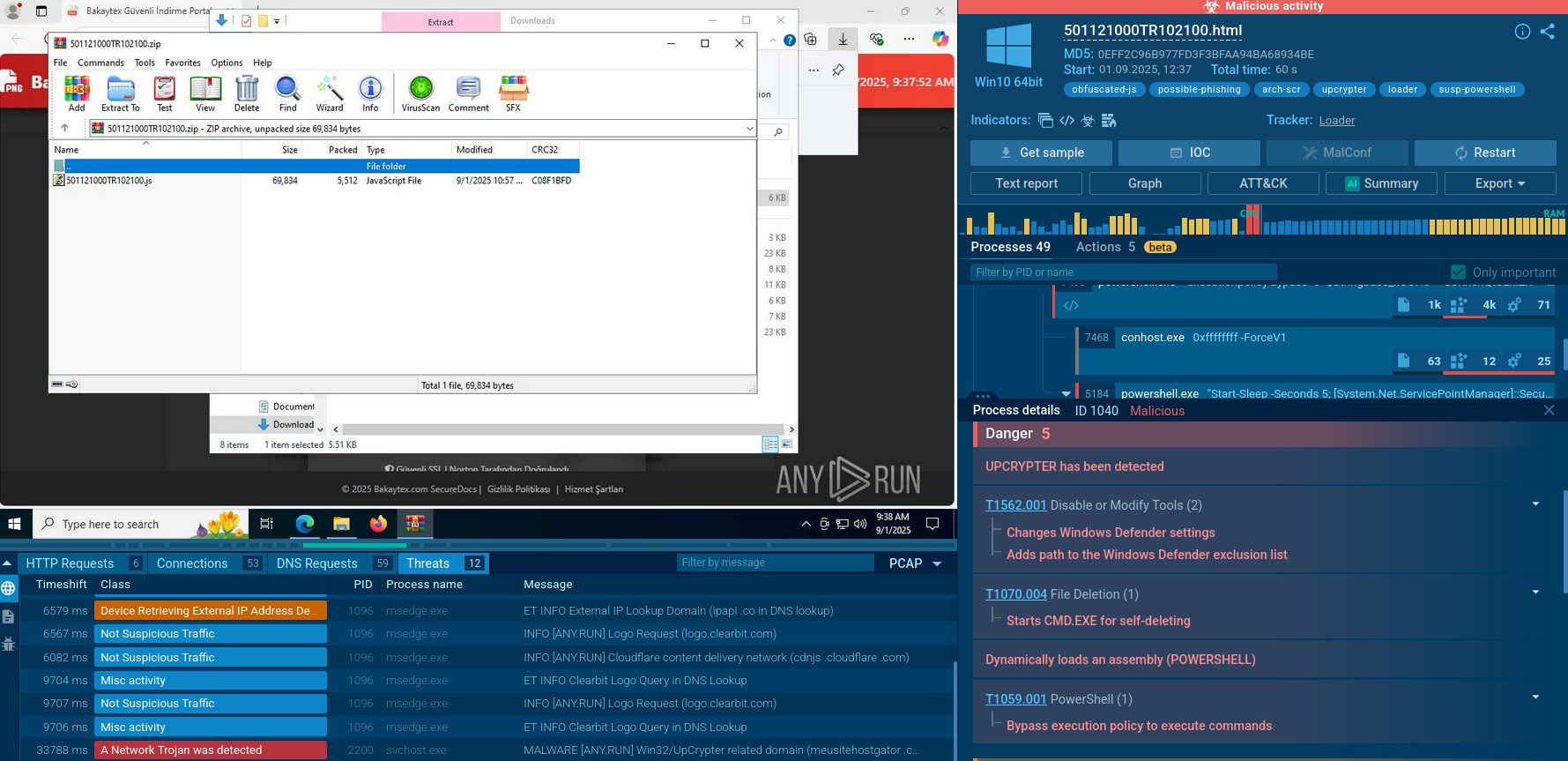 UpCrypterUpCrypter is a sophisticated malware loader that functions as a delivery mechanism for remote access tools. Distributed through global phishing campaigns targeting Windows systems, this actively maintained tool serves as the central framework for deploying various RATs including PureHVNC, DCRat, and Babylon RAT, enabling attackers to establish persistent remote control over compromised systems.
 SnakeSnake is a modular keylogger written in .NET. Adversaries use this malware to exfiltrate confidential data, such as keystrokes, screen captures, and login credentials.
 GuLoaderGuLoader is an advanced downloader written in shellcode. It’s used by criminals to distribute other malware, notably trojans, on a large scale. It’s infamous for using anti-detection and anti-analysis capabilities.
 RatonRATRatonRAT is a .NET-based Remote Access Trojan targeting Windows systems. It supports credential theft, screen capture, system and hardware discovery, persistence, and C2 communication. Samples use techniques such as Registry Run keys and scheduled tasks for persistence, with some variants employing anti-analysis and evasion techniques.
 Forg365Forg365 is a Microsoft 365 PhaaS platform supporting AiTM and device-code phishing, conditional visitor filtering, and identity-focused account takeover.